





Most vehicles have various lights and indicators on the dash to help you understand what’s happening with your car. If some of them light up, such as the check engine light, it can be alarming, as it signals a problem. Others, such as the oil change light, are simply reminders that it’s time to have your car or truck serviced. An essential part of vehicle ownership is knowing why the oil change light comes on, what to do about it, and how to turn it off again.
Why Does the Oil Change Light Come On?
The oil change light will illuminate your car’s dash when it senses it’s time for an oil change. Usually, a vehicle will illuminate the oil change light when you’ve driven a certain number of miles since your last oil change. This is convenient for drivers because you don’t have to keep track of your mileage, such as when you last changed the oil or at what mileage you should change it again.
You don’t want to ignore this signal. Your car tells you it needs new oil to keep running smoothly. Over time, the oil in your car gets dirty. This is a normal process of the oil working in the engine, but you need to replace the oil regularly to keep it doing its job properly. If it becomes too dirty, it causes unnecessary wear on your engine, leading to many problems.
What Should I Do About It?
When you see the oil change light come on, make an appointment to have it changed. You can also change it yourself at home if you’d rather. Ensure you’re prepared with the right equipment and know the correct steps before you begin. It’s best to change the oil as soon as possible once the oil change light comes on.
The standard rule was that the oil in a vehicle needed to be changed once every three months or every 3,000 miles. More recently, changes in the way automobiles and oil are made mean you can now go longer between oil changes. Consult your owner’s manual to find out exactly how long you can wait, but the oil change light in your car should be set to that interval and come on automatically when it’s time for your vehicle to be serviced.
How Soon Do I Need To Have My Oil Changed?
Once you see the change oil light illuminated on your dash, make an appointment to change the oil. You still have about 500 miles before encountering problems, but that’s only about two weeks of driving, or possibly even less if you drive a significant amount. You don’t want to damage your car or truck by ignoring the signs that it needs an oil change.
In the long run, waiting will cost you considerably more than going in for an oil change as soon as possible. So, don’t delay. Make the appointment as soon as you see the light so you know you’ll be able to get your car serviced before the old oil causes any damage.
How Do I Reset the Oil Change Light?
It’s important to know that the oil change light doesn’t automatically reset once you’ve had the oil changed. You’ll have to do this manually; the sooner you do it after the oil changes, the better. This resets the sensor so your vehicle knows when it’s time to change the oil again. If you delay resetting it, you could be driving around with old dirty oil before you even know it’s time for a change.
How you reset the check oil light depends on the make and model of your car or truck. Below, we outline the basic steps to reset the light for some more common vehicle types. If you can’t find your particular vehicle here, the steps to reset the light can be found in your owners manual.
GMC and Chevrolet Vehicles With a Vehicle Information Center (VIC)
- Turn on your car’s power by turning the key in the ignition twice or pushing the start/stop button twice. The dash lights should come on, but the engine will remain off.
- Press the menu button until you see “remaining oil life.”
- Press “set/clr” and then “yes” to reset the oil change light.
Honda With a VIC
- Turn on the car’s power but not the ignition.
- Use your center display to press “settings,” then “vehicle,” then “maintenance options.”
- Find “reset items,” “engine oil,” and then press “reset.”
Ford or Jeep With a VIC
- Turn on your car’s power but not the engine. Do this by turning the key in the ignition twice or pressing the start/stop button twice.
- Use the buttons on the wheel to find “settings” on your dashboard then “vehicle.”
- Find “oil life” and then press and hold “OK.”
GMC, Chevrolet, Dodge, or Jeep (no VIC)
- Turn on the car’s power without starting the engine.
- Press the gas pedal down three times, briefly pausing between each press.
- Turn the car off then back on again.
Honda (no VIC)
- Turn the vehicle’s power on but don’t start the engine.
- Press the trip button until you see “oil life” on the dash.
- Press and hold the trip button until “oil life” starts to blink.
- Release the button, and then press it again until you see “oil life” stop blinking and reset to 100%.
Ford (no VIC)
- Turn on power to your vehicle without starting the engine.
- Press on the gas and brake pedals at the same time.
- Keep holding down the pedals until you see “reset complete” on the dash.
Toyota
- Turn the power on to your vehicle but don’t start the engine.
- Press the trip button on the dash until you see “trip A.”
- Turn the car off, hold down the trip button, then turn the power back on.
- Keep holding the trip button until the “resetting maintenance data” message disappears.
Where Can I Go if I Need Help?
Regular maintenance is essential if you want your vehicle to run smoothly. Don’t skip out on this important part of keeping your car in top shape. If you need an oil change or help resetting your oil change light after your car or truck has been serviced, call our service department. Our knowledgeable and friendly staff are always happy to help.
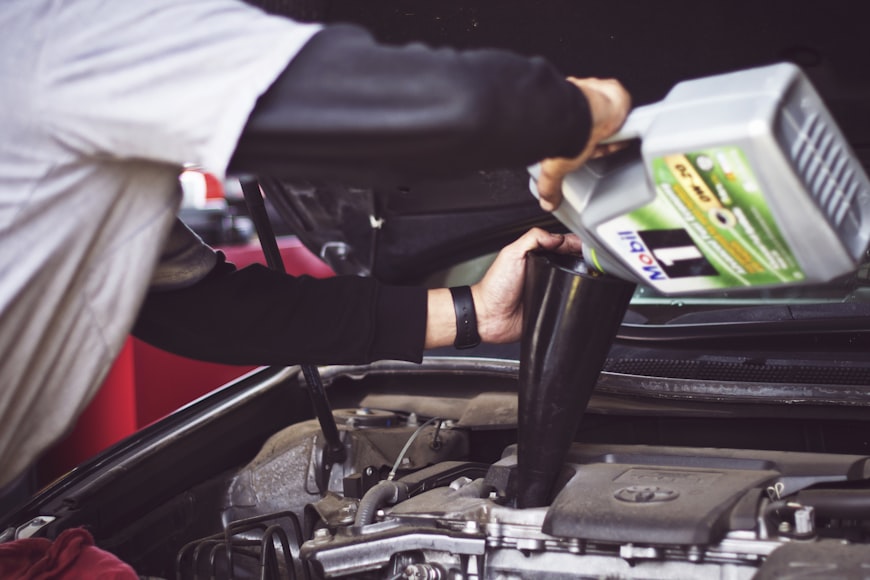
Photo Credit: man refilling motor oil on car engine bay by Tim Mossholder is licensed with Unsplash License
Connect with us


- July 2026
- June 2026
- May 2026
- April 2026
- March 2026
- February 2026
- January 2026
- December 2025
- November 2025
- October 2025
- September 2025
- August 2025
- July 2025
- June 2025
- May 2025
- April 2025
- March 2025
- February 2025
- January 2025
- December 2024
- November 2024
- October 2024
- September 2024
- August 2024
- July 2024
- June 2024
- May 2024
- April 2024
- March 2024
- February 2024
- January 2024
- December 2023
- November 2023
- October 2023
- September 2023
- August 2023
- July 2023
- June 2023
- May 2023
- April 2023
- March 2023
- February 2023
- January 2023
- December 2022
- November 2022
- October 2022
- September 2022
- August 2022
- July 2022
- June 2022
- May 2022
- April 2022
- March 2022
- February 2022
- January 2022
- December 2021
- November 2021
- October 2021
- September 2021
- February 2017
- January 2017
- December 2016
Archives
- Advice
- Challenger Tips
- Chrysler
- Chrysler Features
- Chrysler Service Tips
- Chrysler Tips
- Dodge
- Dodge Charger
- Driving Tips
- Electric Vehicles
- Financing
- Jeep Compass
- Jeep Lineup
- Jeep Owner Tips
- Jeep Tips
- Jeep Wrangler
- Local
- Local Cafes
- Local Shops
- Mopar
- Ram Trucks
- Service Tips
- Uncategorized
- Used Vehicles
- Vehicle Upkeep
- Wagoneer